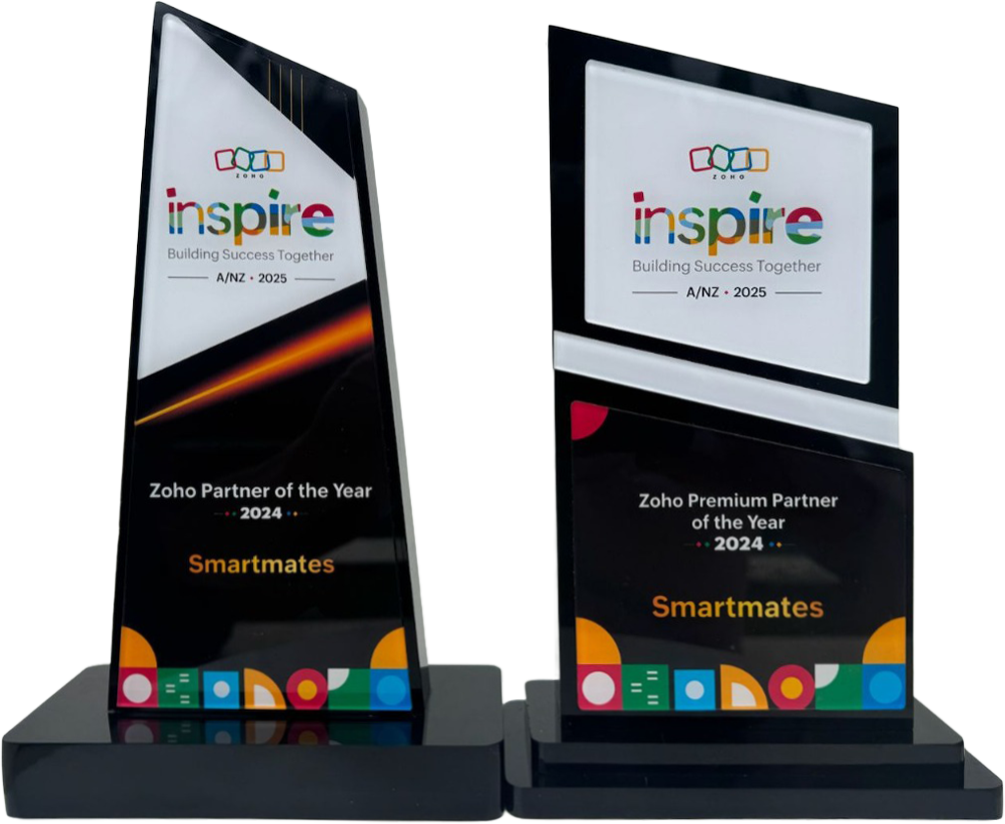
4 Years in a Row
Officially awarded Zoho Partner of the Year in Australia for 2022, 2023, 2024 and 2025. Chosen from 60+ Australian Zoho Partners by Zoho themselves.*
- First Top-Up Special $129 $99/hr + GST
Book your free video conference with our Zoho Consultants
Get your free comprehensive Zoho rollout quotation
Recognised as Australia’s #1 Zoho Partner, 4 years running
Minimum project size 10 consulting hours.

Zoho Training That Supports Growth Without Overcomplicating Systems


You know that sinking feeling when you’ve just invested in shiny new software, your team is staring at the dashboard like it’s written in ancient hieroglyphics, and you’re wondering if you’ve just made an expensive mistake?
Yeah, that’s the Zoho paradox right there.
On one hand, you’ve got this incredibly powerful suite of applications that can genuinely transform how your business operates. CRM that actually tracks your customer relationships. Automation that eliminates those soul-crushing repetitive tasks. Analytics that show you what’s actually working instead of what you hope is working.
On the other hand, you’ve got a learning curve that looks like climbing the Sydney Harbour Bridge. Sideways. In thongs. During a southerly buster.
Here’s the thing about Zoho training that most people get completely wrong. It’s not about cramming your team through boring webinars where someone monotonously clicks through every single feature like they’re reading the phone book. That approach creates confusion, not competence.
Effective Zoho training supports your growth by teaching people exactly what they need to know, when they need to know it, without drowning them in unnecessary complexity. It’s the difference between handing someone a 500-page manual and actually showing them how to drive.
Also read: Zoho Authorized Partners Supporting Fast-Growing Startups
Why Most Zoho Training Falls Flat
Let’s start by diagnosing why Zoho training often fails spectacularly, leaving businesses with expensive software that nobody uses properly.
The Feature Overload Trap
Zoho has over 45 applications. Each application has dozens of features. If you tried to train your team on everything Zoho can do, you’d still be sitting in training sessions when the sun explodes.
Most training programs make this exact mistake. They try to cover everything. Every feature. Every module. Every possible use case. Your team sits through eight hours of information they’ll never need, glazes over, and remembers approximately nothing by Tuesday.
It’s like teaching someone to cook by making them memorise every recipe in existence before they’re allowed to boil an egg. Madness.
Generic Training That Ignores Your Reality
You run a professional services firm in Melbourne, not a manufacturing plant in Munich. Your workflows, processes, and needs are completely different from the business in the generic training video.
When training doesn’t connect to your actual work, it’s just abstract concepts floating in space. Your team can’t see how this feature solves their specific problem or how that automation fits into their daily routine. So they shrug, close the laptop, and go back to doing things the old way.
No Follow-Up or Reinforcement
Here’s what typically happens. Someone attends a training session. They’re enthusiastic. They’re going to use all this brilliant new knowledge. Then they get back to their desk, immediately face seventeen urgent tasks, and forget everything they just learned.
Three weeks later, they need to use Zoho for something. They can’t remember how. They improvise badly. They get frustrated. They decide Zoho is “too complicated” and create a workaround using spreadsheets and sticky notes.
The training investment? Wasted.
Training Without Context or Strategy
The absolute worst approach? Teaching people how to use Zoho without explaining why they’re using it or how it fits into your broader business strategy.
Your team learns to click buttons and fill in fields, but they don’t understand the purpose. They’re following steps mechanically without grasping the underlying logic. When something doesn’t work as expected, they’re completely stuck because they don’t actually understand what they’re doing.
What Effective Zoho Training Actually Looks Like
So what separates training that transforms your operations from training that wastes everyone’s time? Let’s get specific.
Role-Based and Relevant
Your sales team doesn’t need to know how to configure inventory management. Your finance team doesn’t need advanced marketing automation training. Your customer service team doesn’t need to understand pipeline forecasting.
Quality Zoho training is tailored to roles. Each person learns the specific parts of Zoho they’ll actually use in their job. The sales rep learns to manage leads, track opportunities, and update deals. The marketing coordinator learns to build campaigns and analyse engagement. The service agent learns to manage tickets and track resolution times.
This role-based approach means shorter, more focused training sessions that actually stick because everything relates directly to what people do every day.
Hands-On and Practical
Nobody learns to swim by reading about swimming. You learn by getting in the water.
Effective Zoho training is built around doing, not watching. Your team works with real data (or realistic test data that mirrors your business). They complete actual tasks they’ll need to perform regularly. They make mistakes in a safe environment and learn to fix them.
This practical approach builds muscle memory and confidence. By the end of training, people have already successfully completed the core tasks multiple times. They’re not starting from scratch when they go live.
Progressive and Layered
Think about how you learned anything complex in your life. You didn’t master it all at once. You started with fundamentals, got comfortable, then gradually added more sophisticated techniques.
Quality Zoho training follows this same progression. Level one covers the essential daily tasks everyone needs. Get comfortable with that. Then level two introduces intermediate features that improve efficiency. Master those. Then level three adds advanced capabilities for power users who want to optimise further.
This layered approach prevents overwhelm and ensures each new concept builds on solid foundations.
Integrated With Your Processes
The best Zoho training doesn’t teach generic “how Zoho works” concepts. It teaches “how Zoho works specifically for your business processes.”
Trainers use your actual workflows as examples. They demonstrate how to handle scenarios your team encounters regularly. They show how Zoho fits into your existing operations rather than treating it as something separate.
When people see exactly how Zoho supports the work they’re already doing, adoption becomes natural rather than forced.
The Smartmates Approach to Zoho Training
Right, let’s talk about what excellent Zoho training actually delivers in practice. And since we’re being direct here, let me show you how Smartmates approaches this for Australian businesses.
Why Smartmates Training Works Differently
First, they’re not just Zoho trainers reciting features from a script. They’re business consultants who understand operations and growth challenges. Before any training begins, they invest time understanding how your business actually works, what your team needs to accomplish, and where your current pain points are.
This consultative foundation means training addresses real needs, not theoretical possibilities.
Certified expertise you can trust. The Smartmates team holds Zoho certifications, meaning they’ve demonstrated mastery of the platform through rigorous testing. But more importantly, they’ve implemented Zoho across dozens of Australian businesses in different industries. They know what works, what doesn’t, and how to adapt Zoho to suit different business models.
Local knowledge matters. Being Australian-based means Smartmates understands how we operate here. They know our business culture, our regulatory environment, and the specific challenges Australian companies face. Training isn’t some generic international content. It’s tailored to how we actually do business in Australia.
Dual platform expertise creates better outcomes. Unlike trainers who only know Zoho, Smartmates works with both Zoho and HubSpot. This broader perspective means they can recommend the best solution for your specific needs and integrate platforms seamlessly when that makes sense.
But here’s what really sets Smartmates apart: their commitment to training that creates genuine competence, not just compliance.
What working with Smartmates delivers:
You get training programs designed specifically for your business, not generic off-the-shelf courses. You get role-based training that teaches each person exactly what they need without wasting time on irrelevant features. You get hands-on practice with scenarios pulled directly from your operations. You get progressive learning that builds skills systematically rather than dumping everything at once.
And critically, you get ongoing support after initial training. Questions get answered quickly. Refresher sessions happen when needed. Your team has a reliable resource as they encounter new situations and need guidance.
Training isn’t a one-day event. It’s an ongoing partnership that ensures your Zoho investment actually delivers results.
Visit smartmates.com.au to discover how proper Zoho training transforms your team’s capability.
Building a Training Program That Sticks
Let’s get practical about how to structure Zoho training for maximum effectiveness and long-term retention.
Phase One: Foundation Building
Start with the absolute essentials. What does each role need to do daily? Sales team needs to log activities, update deals, and manage contacts. Marketing needs to send campaigns and track engagement. Service needs to manage tickets and respond to customers.
Focus training exclusively on these core tasks first. Get everyone comfortable and confident with the basics before introducing anything else. This foundation phase might only take a few hours per role, but it’s the most critical part of the entire training journey.
Phase Two: Efficiency Enhancements
Once the basics are solid, introduce features that improve efficiency. Automation that saves time. Templates that ensure consistency. Shortcuts that speed up common tasks. Analytics that provide insights.
This second phase builds on what people already know and shows them how to work smarter. Because they’re already using Zoho daily, these enhancements make immediate sense and demonstrate clear value.
Phase Three: Advanced Optimisation
For power users who want to maximise Zoho’s capabilities, phase three covers advanced features. Custom modules. Complex workflows. Advanced reporting. Integration possibilities.
Not everyone needs this level of training, but making it available for those who want it creates internal experts who can help their colleagues and drive continuous improvement.
| Training Phase | Focus | Duration | Audience |
|---|---|---|---|
| Foundation | Essential daily tasks | 2-4 hours per role | Everyone using Zoho |
| Efficiency | Time-saving features and shortcuts | 1-2 hours per role | All regular users |
| Advanced | Complex features and optimisation | 2-4 hours per role | Power users and admins |
Ongoing Support Structure
Training doesn’t end after the formal sessions. Build in ongoing support through:
Office hours. Regular sessions where team members can ask questions and get help with specific challenges they’re facing.
Knowledge base. Document common tasks and solutions so people can find answers independently.
Champions program. Identify enthusiastic users in each department who become internal Zoho experts and help their teammates.
Refresher sessions. Periodic training that reinforces key concepts and introduces new features as they become relevant.
Common Training Mistakes and How to Avoid Them
Even with good intentions, Zoho training can go wrong. Here are the pitfalls to avoid.
Trying to Train Too Much Too Fast
The temptation is to get everyone up to speed immediately. So you pack five days of intensive training and hope people absorb it all. They don’t.
Better approach: spread training over weeks or months. Short, focused sessions with time to practice in between. Let knowledge sink in before adding more.
Skipping the “Why” and Jumping to the “How”
Teaching people to follow steps without explaining the purpose creates robotic behaviour. They can complete tasks by rote but can’t think critically when something goes wrong.
Always explain why you’re doing something before showing how. Help people understand the logic so they can adapt when needed.
Using Test Data Instead of Real Scenarios
Generic training data like “John Smith from ABC Company” doesn’t resonate. Your team can’t see how this relates to their actual work.
Use realistic scenarios based on your business. Better yet, use sanitised real data if possible. When examples mirror reality, learning transfers immediately to daily work.
Treating Training as a One-Time Event
The “train once and they’re done” mentality guarantees failure. People forget. Questions arise. New team members join. Business needs evolve.
Build continuous learning into your culture. Make training an ongoing process, not a checkbox to tick.
Measuring Training Effectiveness
How do you know if your Zoho training is actually working? Here are the metrics that matter.
Adoption Rates
Are people actually using Zoho? Log in frequency tells the story. If team members are avoiding the platform or using it minimally, training hasn’t stuck.
Track usage patterns. Which features are people using? Which are being ignored? This data shows where training was effective and where reinforcement is needed.
Task Completion Time
How long does it take team members to complete common tasks? As competence grows, completion times should decrease. If someone still takes fifteen minutes to update a deal three months after training, something’s wrong.
Error Rates
Quality training reduces mistakes. Monitor data quality, process errors, and the frequency of questions about how to do basic tasks. High error rates indicate gaps in understanding.
Business Impact
Ultimately, training should improve business outcomes. Are sales cycles shortening? Is customer response time decreasing? Is marketing campaign performance improving? Connect Zoho training to actual business metrics to prove ROI.
User Confidence
Don’t overlook qualitative feedback. How confident do team members feel using Zoho? Are they discovering features independently or waiting to be told about everything? Confident users explore and optimise. Anxious users avoid and work around.
Getting Started: Your Zoho Training Strategy
Ready to build a Zoho training program that actually works? Here’s your strategic approach.
Audit Current Competence
Before planning training, understand where your team is now. What do they already know? Where are they struggling? What features are they using well? What capabilities are completely untapped?
This assessment reveals your specific training needs rather than guessing or using generic programs.
Define Success Clearly
What does success look like? Be specific. “Better Zoho usage” is too vague. “Sales team completes all pipeline updates in Zoho within 24 hours” is measurable. “Customer service resolves 90% of tickets without escalation using Zoho knowledge base” is concrete.
Clear success metrics guide training design and let you measure effectiveness.
Prioritise Based on Impact
You can’t train everything immediately. Focus first on the areas that deliver the biggest business impact. Usually that means:
Core revenue activities (sales pipeline management, customer engagement)
Critical efficiency gains (automating manual processes, eliminating duplicate work)
Data quality improvements (ensuring accurate reporting and decision-making)
Start where the value is highest.
Choose the Right Training Format
Different content suits different formats. Core skills benefit from interactive workshops. Quick tips work well as short videos. Complex processes need documentation. Ongoing questions suit office hours or forums.
Mix formats to create a comprehensive learning experience that accommodates different learning styles and schedules.
Build in Accountability
Training works better when there’s accountability. Assign specific Zoho tasks as part of regular work. Review usage in one-on-ones. Recognise people who demonstrate competence. Make Zoho proficiency part of performance expectations.
When people know they’re expected to use what they’ve learned, they pay attention and follow through.
Avoiding the Overcomplicated System Trap
Here’s a critical insight about Zoho training: the goal isn’t to use every feature Zoho offers. It’s to use the right features for your business effectively.
Complexity Is the Enemy of Adoption
Every additional feature you enable, every custom field you create, every workflow you build adds complexity. Some complexity is valuable because it solves real problems. Much complexity is just clutter that makes systems harder to use.
Quality training includes knowing what not to use. Experienced trainers help you distinguish between features that genuinely support your growth and features that just complicate your systems unnecessarily.
Start Simple, Add Strategically
Launch with the minimum viable Zoho setup that addresses your core needs. Train people thoroughly on this streamlined version. Get it working smoothly. Then add capabilities strategically as needs arise.
This approach prevents overwhelm and ensures every feature earns its place by solving a real problem.
Regular Simplification Reviews
Every few months, review your Zoho setup. Are there features you enabled but nobody uses? Fields you collect but never analyse? Workflows that made sense last year but are now redundant?
Prune ruthlessly. Simpler systems are easier to train, easier to use, and more likely to be adopted enthusiastically.
Transform Your Team’s Capability
Here’s what it comes down to. Zoho is powerful. Really powerful. But power without competence is just expensive shelfware gathering digital dust.
Effective Zoho training is the bridge between potential and performance. It’s the difference between a team that grudgingly uses Zoho because they have to and a team that leverages Zoho confidently because they understand how it makes their work easier.
It’s the difference between systems that complicate your operations and systems that support genuine growth.
But achieving this outcome requires more than generic webinars or self-service video libraries. It requires training that’s strategically designed for your business, tailored to your team’s roles, delivered in digestible progressive stages, and supported with ongoing guidance as questions and needs evolve.
That’s exactly what quality Zoho training partners like Smartmates deliver. You get certified experts who understand both the platform and business operations. You get training programs designed specifically for your needs, not generic templates. You get role-based learning that teaches people exactly what they need without wasting time. You get hands-on practice with realistic scenarios from your actual work. You get progressive development that builds competence systematically.
And you get ongoing support that ensures training translates into genuine capability and sustained performance improvement.
Your Zoho investment only delivers ROI when your team actually uses it effectively. Generic training rarely achieves that. Self-taught fumbling wastes time and creates frustration. The right training partner accelerates everything.
Ready to transform your team’s Zoho capability without overcomplicating your systems? Connect with Smartmates at smartmates.com.au and discover how strategic Zoho training builds genuine competence, drives enthusiastic adoption, and ensures your technology investment actually supports growth instead of creating headaches. Your team’s capability determines your technology ROI. Make it count.
Request a Callback from Smartmates

Sarah
I’ll listen to your Zoho needs to understand your business challenges and goals, ensuring a tailored approach.
I’ll bring a certified Zoho engineer to our first consultation to explore solutions and clarify your requirements.
We’ll deliver your free project plan quotation, detailing the steps, timeline, and costs—up to this point, it’s completely free!
“My mission is to solve your key problems, build your trust in our capabilities and deliver exceptional value for money.”