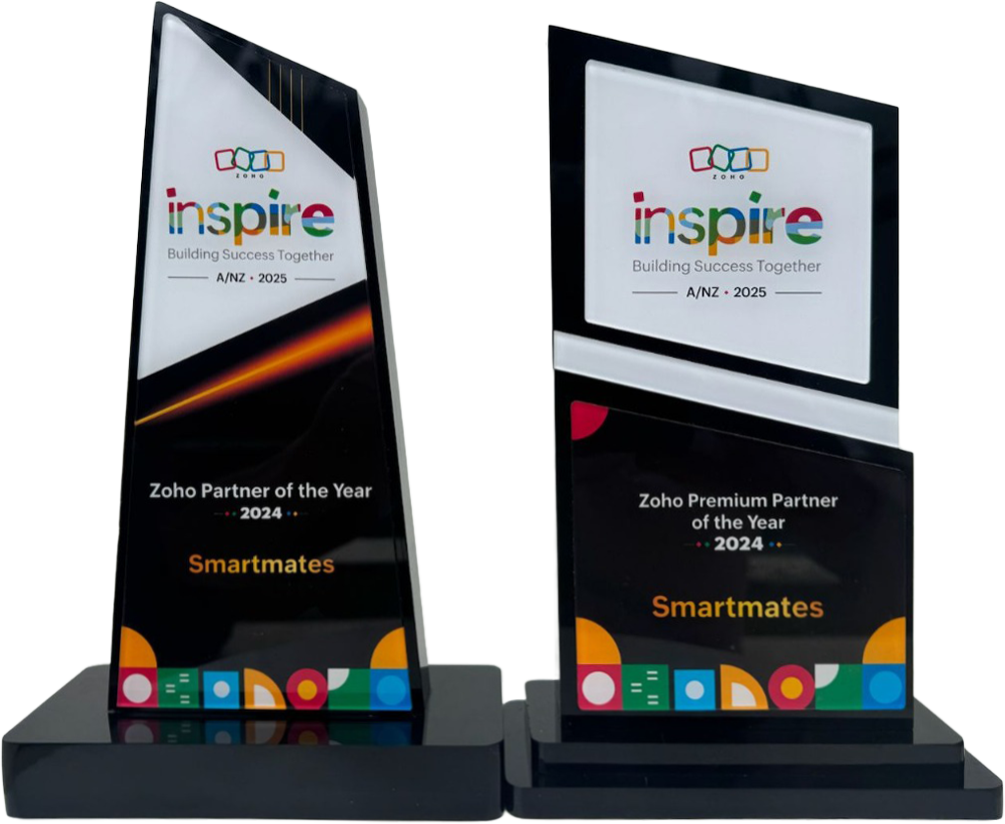
Recognised as Australia’s Best Zoho Partner for 2022, 2023, 2024 and 2025, we help businesses unlock the full potential of Zoho Integrations.*
First Top-Up Special: only $99/hr + GST (save $30/hr)
- Book a video call with our specialists.
- Get a detailed, personalised setup and optimisation plan.
Let Smartmates transform your data into actionable insights.
Minimum project size 10 consulting hours.
*Based on Partner Points, as per Zoho’s partner assessment criteria.

Zoho Integration Services Australia
Smartmates helps Australian businesses connect Zoho CRM, Zoho One and other Zoho apps with the systems they already use, including Xero, MYOB, Shopify, Microsoft 365, Gmail, Google Workspace, DocuSign, Zapier and custom business platforms.
We do not just switch on connectors. We help plan what should sync, which system should be the source of truth, how errors are handled, and how the integration will be supported after go live.
If you need Zoho integration services, you are likely trying to reduce manual work, improve data accuracy and connect workflows properly without creating new problems. Smartmates helps you choose the right integration method and build it around your business process.
What Zoho Integration Actually Means
A Zoho integration connects Zoho apps with another business system so records, tasks, statuses, files, messages, transactions or workflow triggers can move between them. For example, a closed Zoho CRM deal can create an invoice in Xero, a Shopify order can update Zoho Inventory, or a DocuSign status can update a CRM deal.
The key question is not only “Can Zoho connect to this app?” It is “What should sync, in which direction, under which rules, and what happens if something fails?” Smartmates designs integrations around those decisions.
Popular Zoho Integrations Smartmates Can Help With
The integrations below are common starting points for Australian businesses. If your required system is not listed, Smartmates can still review whether it can be connected through Zoho Flow, Zoho Marketplace, Zapier, Make, API, webhook, Deluge function, middleware or a custom integration approach
Zoho + Xero Integration
Connect Zoho CRM or Zoho One with Xero for customer records, invoice handovers, payment visibility, GST mapping and finance workflow control.
)
Zoho + Microsoft 365 Integration
Link Zoho with Outlook, Microsoft 365 email, calendars, contacts, documents and team workflows where users already work every day.
Zoho + Google Workspace Integration
Connect Gmail, Google Drive, Calendar and Workspace processes with Zoho CRM, Zoho Desk, Zoho Projects or other Zoho apps.

Zoho + Shopify Integration
Sync ecommerce customers, orders, products, inventory, fulfilment status and CRM activity so online sales are easier to manage.
)
Zoho + DocuSign Integration
Connect document signing with Zoho CRM, Zoho Projects or Zoho Desk so contract status and approval steps are visible to the right team.

Zoho + Zapier Integration
Use Zapier where a lightweight app connection is suitable, while keeping ownership, field mapping and error handling clear.
Zoho + RingCentral Integration
Connect calling activity with Zoho CRM so sales and support teams have better customer communication context.

Zoho + Outlook Integration
Link Outlook email, calendar and contact activity with Zoho CRM so customer communication is easier to track.

Zoho + Gmail Integration
Bring Gmail activity into Zoho CRM so sales and service teams can see important customer conversations in context.

Zoho + Dropbox Integration
Connect files and folders with Zoho workflows so documents are easier to manage across customers, projects and approvals.
How Smartmates Chooses The Right Integration Method
Different Zoho integrations need different methods. A simple workflow may suit a native connector, Zoho Flow, Zapier or Make. A complex finance, ecommerce or operational sync may need API, webhook, Deluge, middleware or a hybrid approach.
Smartmates helps decide the safest method based on field mapping, sync direction, tax logic, duplicate handling, error logs, testing needs and long term support. The goal is to avoid over-engineering simple workflows while making sure business critical integrations are reliable.
What Should Be Decided Before Building?
A reliable Zoho integration starts with clear sync logic. Before building, Smartmates helps define:
- Objects: Which records should sync, such as leads, contacts, invoices, orders, tickets, tasks, files or payments.
- Direction: Whether data moves from Zoho, into Zoho, or both ways.
- Source of truth: Which system owns each field after go live.
- Triggers: Whether sync runs on create, update, status change, schedule, webhook or approval.
- Field mapping: Which fields match, transform, calculate or stay separate.
- Duplicates and errors: How records are matched, failed syncs are logged, and issues are reviewed.
- Security and testing: Which users, credentials, permissions and sample records are required before live data is touched.
Example Zoho Integration Scenarios
Common examples include Zoho CRM and Xero for invoice handovers, Zoho CRM and Microsoft 365 for customer communication visibility, Zoho Inventory and Shopify for ecommerce orders and stock, Zoho CRM and DocuSign for contract status tracking, and Zoho Desk with communication tools for better support context.
Smartmates can also review custom platforms, internal databases, portals, payment systems, scheduling tools, HR systems, inventory platforms and industry specific software. If safe automation is not possible, we can recommend a practical alternative such as semi-automation, staged import, reporting sync or manual approval.
How Long Does A Zoho Integration Take?
Timing depends on the number of systems, objects, field mappings, data quality, API limits, testing needs and custom logic.
A simple integration may take 1 to 2 weeks after scope approval and around 10 to 20 consulting hours. A moderate integration may take 2 to 4 weeks and around 20 to 40 hours. Advanced API, webhook, line item, tax, staged sync or duplicate handling work may take 4 to 8 weeks or more depending on complexity.
Smartmates provides a free Planning Session and Project Plan Estimate before paid work begins. The First Top Up is available from $99/hr + GST, then ongoing Top Up work is charged from $129/hr + GST. There is no monthly retainer and no minimum monthly spend.
Why Work With Smartmates?
Smartmates is a specialist Zoho consulting firm serving Australian businesses that need practical help with Zoho CRM, Zoho One, automation, integrations, migration, reporting, training and process improvement. We are a Zoho Premium Partner and Zoho Partner of the Year for 2022, 2023, 2024 and 2025.
Our Senior Team helps avoid common integration mistakes such as unclear source of truth, vague field mapping, duplicate records, uncontrolled two way sync, missing error logs and undocumented automation. With The Smartmates Model, you get structured planning, senior Zoho engineering support, transparent consulting and flexible Top Up based delivery.
Zoho Integration FAQs
What are Zoho integration services?
Zoho integration services connect Zoho apps such as Zoho CRM, Zoho One, Zoho Desk, Zoho Inventory, Zoho Projects or Zoho Books with other business systems. This can include field mapping, workflow automation, API integration, data sync, error handling, testing and support.
Can Zoho integrate with Xero, MYOB, Shopify and Microsoft 365?
Yes, but the best method depends on the required records, sync direction, field mapping, approval rules, data quality and technical access available in each platform.
Do we need Zoho Flow or custom API integration?
Zoho Flow may suit standard cloud workflows. Custom API or Deluge work may be needed for complex mapping, line items, tax logic, webhooks, duplicate prevention, staged sync or advanced error handling.
How much does a Zoho integration cost?
Cost depends on complexity. Simple integrations may require 10 to 20 consulting hours, while moderate or advanced integrations may require 20 to 40+ hours. Smartmates starts with a free Planning Session and Project Plan Estimate.
Book A Free Zoho Integration Planning Session
If you need Zoho connected with another system, start with a clear integration plan before paying for build work. Smartmates will help confirm what should sync, which method is safest, what the likely timeline looks like, and what should be checked before implementation begins.
Request a Callback from Smartmates

Zoe Kaura
I’ll listen to your Zoho needs to understand your business challenges and goals, ensuring a tailored approach.
I’ll bring a certified Zoho engineer to our first consultation to explore solutions and clarify your requirements.
We’ll deliver your free project plan quotation, detailing the steps, timeline, and costs—up to this point, it’s completely free!
“My mission is to solve your key problems, build your trust in our capabilities and deliver exceptional value for money.”