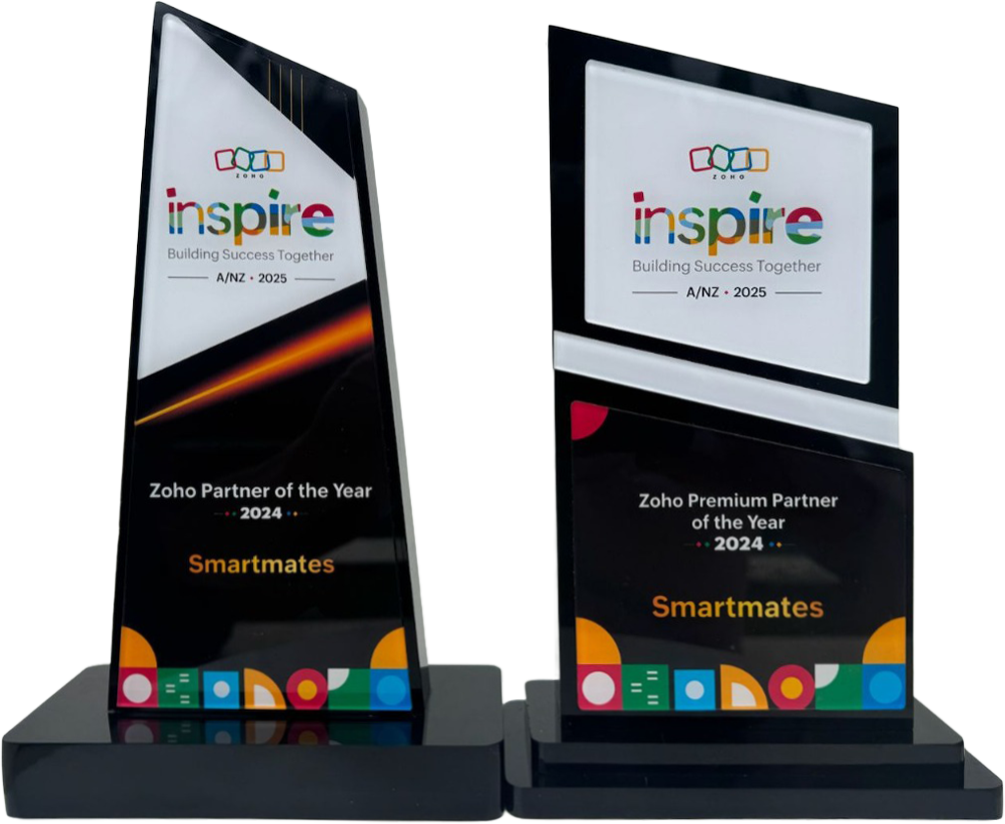
4 Years in a Row
Officially awarded Zoho Partner of the Year in Australia for 2022, 2023, 2024 and 2025. Chosen from 60+ Australian Zoho Partners by Zoho themselves.*
- First Top-Up Special $129 $99/hr + GST
Book your free video conference with our Zoho Consultants
Get your free comprehensive Zoho rollout quotation
Recognised as Australia’s #1 Zoho Partner, 4 years running
Minimum project size 10 consulting hours.

Zoho CRM Customisation Built Around Real Workflows Not Templates

Here’s a conversation that happens in Australian businesses every week. Someone decides the company needs a CRM. They choose Zoho because it’s powerful and affordable. Then they either try to implement it themselves or hire someone who promises a “quick setup using our proven templates.”
Three months later, the team is frustrated. The CRM doesn’t match how they actually work. Sales processes are shoehorned into generic stages that don’t reflect reality. Custom fields are either missing entirely or cluttered with irrelevant options. Automation triggers at the wrong times. Reports show data nobody needs while missing the insights that matter.
The problem isn’t Zoho. The platform is incredibly flexible and powerful. The problem is treating your unique business like it should fit into someone else’s template.
Let me show you what proper Zoho CRM customisation looks like when it’s built around your actual workflows instead of generic templates.
Why Templates Fail (And Why Everyone Still Uses Them)
Templates are appealing. They promise quick implementation. They look professional in demos. They’re based on “best practices” from successful companies. What’s not to like?
Here’s what: your business isn’t a template. Your sales process has quirks that matter. Your customer journey is different. Your team works in specific ways that have evolved for good reasons. Your industry has unique requirements.
When you force your business into a template, one of two things happens. Either you change your workflows to match the template (usually making things worse), or you try to bend the template to fit your reality (which never quite works).
The result? A CRM that everyone tolerates but nobody loves. Adoption is half-hearted. Data quality suffers because people find workarounds. The system becomes a compliance exercise rather than a useful tool.
Real Zoho CRM customisation starts differently. It starts by understanding how your business actually operates, then building a system around that reality.
How Smartmates Approaches Zoho CRM Customisation
We don’t show up with pre-built templates and try to convince you they’ll work. We show up with questions. Lots of them. Because before we customise anything, we need to understand everything.
What does your sales process actually look like? Not the idealised version in your head. The messy, real-world version where deals sometimes skip stages, where customers come back months later, where referrals move faster than cold leads.
How does your team currently work? What information do they need at each stage? What slows them down? Where do things fall through cracks? What workarounds have they developed?
What makes your customers different? How do they prefer to communicate? What influences their buying decisions? How long are typical sales cycles? What causes deals to stall or die?
What data actually matters to your business? Not what some generic report thinks you should track. What specific metrics drive your decisions?
Only after understanding all of this do we start building your Zoho CRM customisation. And what we build looks nothing like a template because it’s designed specifically for you.
Custom Fields That Actually Make Sense
Standard CRM fields are fine for basics. Company name, contact details, deal value. But every business needs to track additional information specific to their operation.
The template approach gives you a bunch of predetermined custom fields that might be relevant. Maybe. The real approach identifies exactly what information your team needs at each stage of your process.
A Melbourne-based construction company needed to track specific details about each project: site access restrictions, council approval status, environmental considerations, preferred subcontractors, material supplier relationships. None of this exists in templates. All of it matters to their business.
We built custom fields that captured this information naturally as part of their workflow. Sales reps entering a new opportunity were prompted for relevant details at the right time. Project managers could see everything they needed without hunting through notes or calling the sales team.
The fields weren’t just added randomly. They were structured to support decision-making. Dropdown menus with the actual options the team needed. Date fields that triggered workflow automation. Lookup fields that connected to other relevant data.
This is what proper Zoho CRM customisation looks like. Fields designed around how your team works and what your business needs.
Also read: Why Growing Teams Choose Zoho Consultants For Scale
Sales Stages That Reflect Your Reality
Most CRM templates give you something like: Lead, Qualified, Proposal, Negotiation, Closed Won, Closed Lost. Simple. Clean. Completely inadequate for most businesses.
Your sales process is more nuanced. Different types of opportunities move differently. Some stages matter more than others. Some deals skip stages. Some need approval gates.
We map your actual sales stages, including the messy bits templates ignore:
Discovery stages where you’re still figuring out if there’s a real opportunity
Technical validation where solutions need to be proven before pricing
Multi-stakeholder approval where deals sit waiting for committee decisions
Pilot or trial periods that don’t fit neatly into “negotiation”
Implementation planning that happens before the deal closes
Renewal pipelines that function differently from new business
Your Zoho CRM customisation should have stages that match these realities. And different opportunity types can have completely different stage progressions because that’s how business actually works.
Automation Built Around How You Operate
Generic automation in templates goes something like this: when a lead comes in, send an email. When a deal reaches proposal stage, notify the manager. When an opportunity is won, create a project.
Functional. Basic. Missing 90% of what automation could do for your specific business.
Real Zoho CRM customisation builds automation around your specific workflows:
When a particular type of lead comes in, assign it based on territory, product type, or lead source. Then trigger a specific nurture sequence relevant to that lead type. Notify the right person with context they actually need.
When a deal reaches a certain stage, check if required information is complete. If not, prevent progression and alert the rep about what’s missing. If yes, automatically generate relevant documents, notify appropriate stakeholders, and schedule required follow-ups.
When a customer hasn’t been contacted in X days, create tasks based on account type and relationship strength. High-value customers get different treatment than small accounts.
When specific triggers happen, connect to external systems. Update your project management tool. Notify your fulfilment team. Sync to your accounting system. Update your marketing automation.
This level of automation doesn’t come from templates. It comes from understanding your operations deeply and building workflows that multiply your team’s effectiveness.
Integration That Connects Your Business
Your business doesn’t run on CRM alone. You’ve got accounting software, email marketing platforms, project management tools, support systems, e-commerce platforms. These need to connect.
Template implementations either ignore integration entirely or offer basic, generic connections that don’t quite do what you need.
Proper Zoho CRM customisation builds integration as a core feature:
Two-way sync with accounting systems like Xero or MYOB so financial data stays current automatically
Marketing automation integration where leads flow seamlessly and campaign performance tracks properly
Customer support connections where support tickets link to customer records and history is visible
E-commerce platform sync where online orders create CRM records and customer data stays unified
Project management integration where won deals automatically create projects with relevant details
Custom API connections to industry-specific tools that matter to your business
Integration isn’t an afterthought. It’s fundamental to making your CRM the central hub of your business operations.
Reports and Dashboards That Answer Your Questions
Template dashboards show you what someone thinks you should want to know. Deal pipeline by stage. Win rates over time. Activity metrics. All fine, but probably not the specific insights you need.
Real Zoho CRM customisation builds reporting around the questions you actually ask:
Which lead sources deliver the highest lifetime value, not just the most leads?
How do deal sizes vary by industry, region, or sales rep?
What’s our true sales velocity when you account for our specific stage definitions?
Which opportunities are at risk based on our specific warning signs?
How are different customer segments behaving differently?
What’s the ROI of specific marketing campaigns across the full customer journey?
We build custom reports and dashboards that answer these questions clearly. Your team opens the CRM and immediately sees what matters to them. Sales reps see their pipeline with relevant context. Managers see team performance and trends. Executives see strategic metrics that inform decisions.
No hunting through generic reports trying to find relevant information. Just clear answers to important questions.
User Experience Designed for Your Team
Templates give everyone the same interface. Sales reps see the same thing as customer support. New team members get the same view as experienced managers. This makes no sense.
Your Zoho CRM customisation should provide different experiences for different roles:
Sales reps see a streamlined interface focused on moving deals forward. Quick access to their pipeline, easy task management, simple contact lookup. No clutter from information they don’t need.
Sales managers see team performance, pipeline health, forecasting tools, and coaching opportunities. They can drill into individual rep activity when needed.
Customer support sees ticket history, product information, and escalation workflows. Sales pipeline details they don’t need are hidden.
Marketing teams see campaign performance, lead quality metrics, and segmentation tools. Deal stages that don’t concern them stay out of the way.
Executives see high-level dashboards with strategic metrics and easy drill-down when they want details.
This customisation makes the CRM faster and easier for everyone because they’re only seeing what’s relevant to their role.
The Discovery Process That Makes Customisation Work
Proper Zoho CRM customisation starts with thorough discovery. We spend time understanding your business before building anything. This isn’t a formality. It’s where the real value gets created.
Process Mapping: We document your actual workflows. How do opportunities really move through your business? Where do they stall? What causes deals to die? What makes them accelerate?
Stakeholder Interviews: Different people see different aspects of how the business operates. Sales has one perspective, operations another, finance yet another. We talk to everyone.
Pain Point Identification: What’s frustrating about current systems? Where do things break? What takes longer than it should? Where does information get lost?
Data Analysis: If you have existing systems, what does the data tell us about how things really work versus how people think they work?
Future State Visioning: Where is your business headed? How will processes need to evolve? What capabilities will you need that you don’t need today?
This discovery phase typically takes a few weeks. It feels long when you’re eager to get started. But this is what separates customisation that transforms your business from templates that disappoint.
| Template Approach | Custom Workflow Approach |
|---|---|
| One-size-fits-all stages | Stages matching your actual process |
| Generic fields everyone gets | Fields your business actually needs |
| Basic automation rules | Workflows supporting your operations |
| Standard reports | Insights answering your questions |
| Same interface for everyone | Role-specific user experiences |
| Quick implementation | Thoughtful implementation that lasts |
| Adapts when it breaks | Adapts as your business evolves |
Industry-Specific Customisation Examples
Different industries need radically different Zoho CRM customisation. Let me show you what this looks like in practice.
Professional Services: Project-based selling with resource allocation, skills matching, capacity planning, proposal collaboration, scope change tracking, and time capture integration.
Manufacturing: Long sales cycles with technical specifications, quote management with complex pricing, production scheduling integration, distributor management, and compliance documentation.
Technology and SaaS: Trial management, feature-based selling, usage tracking integration, expansion revenue tracking, technical onboarding workflows, and subscription analytics.
Healthcare: Referral source tracking, patient privacy compliance, appointment coordination, insurance verification, treatment plan management, and outcome tracking.
Real Estate: Property matching algorithms, buyer qualification workflows, inspection scheduling, settlement coordination, vendor management, and commission tracking.
Whatever your industry, your Zoho CRM customisation should reflect the specific way your sector operates, not how CRM vendors think businesses should work.
The Role of Zoho Creator in Deep Customisation
Sometimes your business needs go beyond what standard CRM customisation can deliver. That’s where Zoho Creator comes in.
Zoho Creator lets us build completely custom applications that integrate seamlessly with your CRM. Need a complex approval workflow? A custom calculator? A specialised tracking system? A unique portal for partners or customers?
We build it in Creator and integrate it with your CRM so it feels like one unified system. Your team gets exactly the tools they need without compromise.
This is advanced Zoho CRM customisation that most businesses don’t even know is possible. But for companies with unique processes that create competitive advantage, it’s transformative.
Managing Change and Driving Adoption
The best Zoho CRM customisation in the world fails if your team doesn’t use it. That’s why we focus heavily on change management and adoption.
Training That Actually Sticks: Not generic training on Zoho features. Specific training on how your customised system works and why it was designed that way.
Documentation: Clear, accessible guides showing exactly how to do common tasks in your specific setup.
Champions: Identifying enthusiastic team members who become internal experts and help colleagues adapt.
Phased Rollout: Implementing in stages so people aren’t overwhelmed by too much change at once.
Feedback Loops: Regular check-ins to understand what’s working and what needs adjustment.
Continuous Improvement: Your business evolves. Your Zoho CRM customisation should evolve with it.
Adoption isn’t an accident. It’s the result of thoughtful implementation focused on making people’s lives easier, not harder.
The True Cost of Getting It Wrong
What happens when you go with template implementations instead of proper customisation?
Initially, it seems fine. The CRM works at a basic level. Data gets entered. Reports exist. But over time, problems compound:
Low adoption rates because the system doesn’t match how people work
Data quality degrades as people find workarounds and stop trusting the system
Duplicate work as information gets tracked in CRM and separately in spreadsheets or other tools
Missed opportunities because the system doesn’t flag what matters
Wasted potential as you use 20% of what the platform could do for you
Then, 12-18 months later, you’re looking at reimplementation. All that time and money spent on the initial setup was largely wasted. You’re starting over, this time hopefully getting it right.
The cost of poor implementation isn’t just the initial investment. It’s the ongoing operational inefficiency and the eventual need to do it again properly.
Why Australian Businesses Choose Smartmates
We’re not an international consultancy applying cookie-cutter approaches to Australian businesses. We’re locals who understand how businesses operate here.
We know Australian market dynamics, business culture, and operational realities. We work in your time zone. When you need support, we’re available. When we implement systems, they account for GST, Australian privacy laws, and local business practices.
We’ve customised Zoho CRM for dozens of Australian businesses across every industry. From small teams to enterprises. From simple implementations to complex, multi-system integrations.
What sets us apart isn’t just technical expertise. It’s our commitment to understanding your business deeply and building solutions that genuinely fit. We’re not trying to complete projects quickly and move on. We’re building partnerships with businesses committed to operational excellence.
The Smartmates Customisation Process
Here’s exactly what happens when you work with us for Zoho CRM customisation:
Discovery and Analysis (2-4 weeks): Deep dive into your business, processes, and requirements. We document everything and identify customisation opportunities.
Solution Design (1-2 weeks): We design your custom system and review it with you. Adjustments happen before any building starts.
Configuration and Development (4-8 weeks): We build your customised CRM, including custom fields, workflows, automation, reports, and integrations.
Testing and Refinement (1-2 weeks): Thorough testing to ensure everything works as intended. Adjustments based on user feedback.
Training and Rollout (2-3 weeks): Comprehensive training for your team. Phased rollout with support at every stage.
Ongoing Support: Continuous support as you use the system, with regular reviews and optimisation.
This isn’t the fastest implementation you could get. But it’s the one that will actually transform your business rather than just give you another system to tolerate.
Transform Your Business with Proper Customisation
Your business is unique. Your competitive advantages come from doing things differently and better than others in your market. Your CRM should support and amplify these differences, not force you into generic templates.
Proper Zoho CRM customisation isn’t about adding bells and whistles. It’s about building a system that works exactly how your business works. That makes your team more effective. That provides insights you can actually use. That grows with you as your business evolves.
Smartmates has helped Australian businesses transform their operations through thoughtful, customised Zoho CRM implementations. We’ve seen what’s possible when systems are designed around real workflows instead of templates.
Ready to have a CRM that actually fits your business? Ready to stop compromising and start optimising? Ready to see what Zoho can really do when it’s customised properly?
Visit smartmates.com.au and schedule a consultation. We’ll talk about your business, your challenges, and how custom Zoho CRM implementation could transform your operations.
No pressure. No templates. Just honest conversation about whether we’re the right fit to help you build the CRM your business deserves.
Your team will thank you when they’re working in a system designed for them, not despite them. Your customers will notice when interactions are smoother and more personalised. Your business will benefit when data actually informs decisions.
The difference between template CRM and customised CRM is the difference between software you use and systems that transform your business.
Which one do you want?
Request a Callback from Smartmates

Sarah
I’ll listen to your Zoho needs to understand your business challenges and goals, ensuring a tailored approach.
I’ll bring a certified Zoho engineer to our first consultation to explore solutions and clarify your requirements.
We’ll deliver your free project plan quotation, detailing the steps, timeline, and costs—up to this point, it’s completely free!
“My mission is to solve your key problems, build your trust in our capabilities and deliver exceptional value for money.”